Modern software and technologies are often so complex that it's inevitable there will be some glitches or odd behaviours to begin with. In the case of Nvidia's new Dynamic Multi Frame Generation, which all RTX 50-series owners can now use, there is definitely one problem that needs to be addressed.
To get a complete handle on screen tear, many PC gamers prefer to set a frame rate cap a little below the maximum refresh rate. That way the performance always remains with the window that the monitor's variable refresh rate operates, and you get silky smooth frames on the screen.
(Image credit: Nvidia)
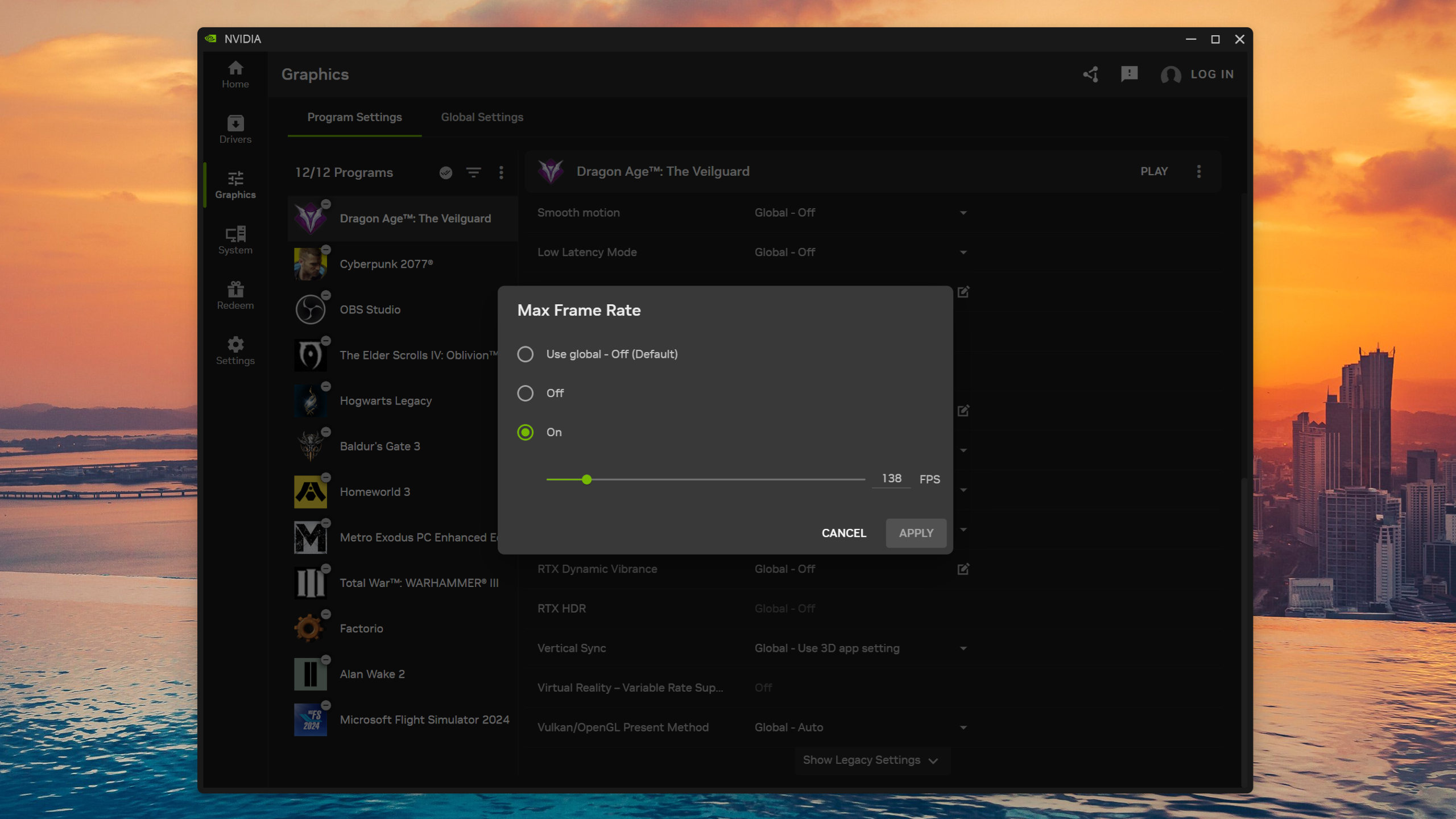
You can do this in some games directly, but it's best to do it via Nvidia's drivers, either in the Nvidia Control Panel or in the global settings of the Nvidia App. Using Dragon Age: The Veilguard, running at 4K with DLSS Quality and the High graphics preset, on a Ryzen 9 9950X3D and RTX 5070 combo, I found that Dynamic MFG fully behaved itself when used without any limit to the frame rate.
That said, it also lets the performance completely overshoot the refresh rate. However, when I set a cap of 138 fps in Nvidia App, Dynamic MFG decided that it didn't want to play ball and just ran in 6x mode all the time.
While the performance you get is fine, the reported PCL figure certainly isn't. When using DMFG without any limit to the frame rate, it comfortably sits around the 30 millisecond mark, which is nice and smooth to game with. With the 138 fps cap, though, the PCL jumps to around 50-60 milliseconds, which certainly isn't smooth.
I've tried a variety of different settings in the game, but in all cases, when using a frame rate cap in Nvidia App, Dynamic MFG just locks to a fixed mode. In one example, it always stayed in 3x, which was okay to game with as the PCL remained under 40 milliseconds.
This could be a bug or just a limitation of how Nvidia's Dynamic MFG all works. Hopefully, it's the former, because that means there's a chance it could be fixed at some point in the future. If it turns out to be a limitation of the system itself, then you'll want to stick to the standard Multi Frame Generation if you always use a frame rate cap.
I've also seen some reports that DMFG doesn't like certain performance overlays, such as MSI Afterburner/RTSS, but having tested that in a few games, it doesn't appear to be an issue. In Cyberpunk 2077, Dragon Age: The Veilguard, Oblivion Remastered, and Hogwarts Legacy, RTSS displays correctly, and Dynamic MFG works as intended.
That doesn't mean there aren't games where RTSS and DMFG don't play happily together, and if you're currently experiencing such issues, flag 'em up below in the comments.
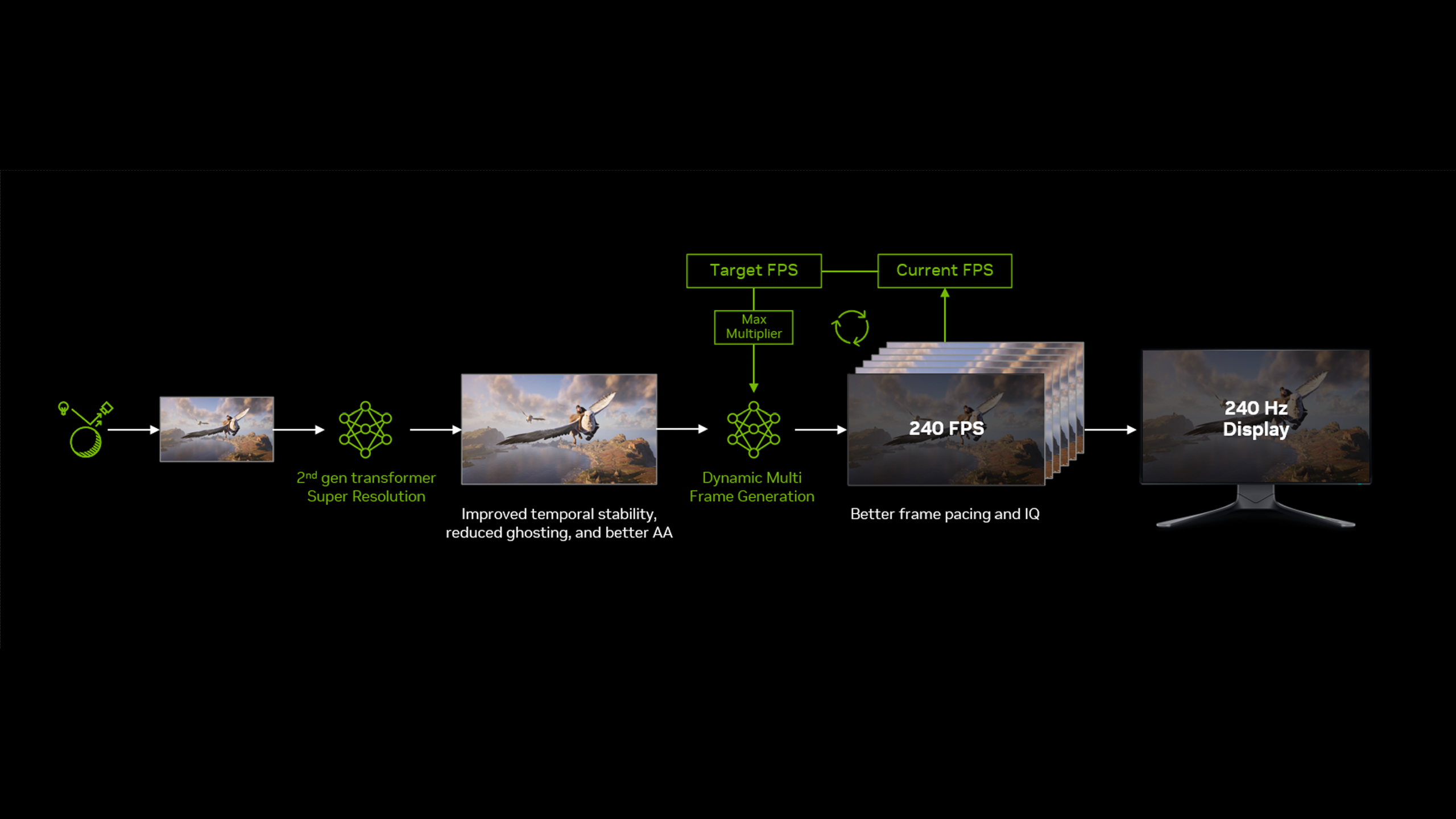
The Nvidia App beta has been updated to include DLSS 4.5 Dynamic Multi Frame Generation support for RTX 50-series owners. The much-anticipated tech allows for dynamic adjustment of AI generated frames based on a target frame rate, with the goal being consistently smooth, high fps gameplay.
The tech allows for up to 6x frame generation, which is a considerable boost over the 4x maximum of previous efforts. Our Nick has been testing the tech recently and has come away somewhat impressed, although there are caveats to maxing out the number of generated frames, particularly on lower spec cards.
DMFG can be either activated as a global option, or per individual game via the Graphics tab in the Nvidia App. The app can be configured to sync up with your monitor's refresh rate, or configured to a custom max frame rate for those who like to tweak the settings.
A new DLSS Frame Generation model (for RTX 40-series and 50-series cards) is also included with the update, which aims to take into account UI screen elements and provide better stability of frame-generated images when interacting with onscreen overlays and text.
(Image credit: Nvidia)
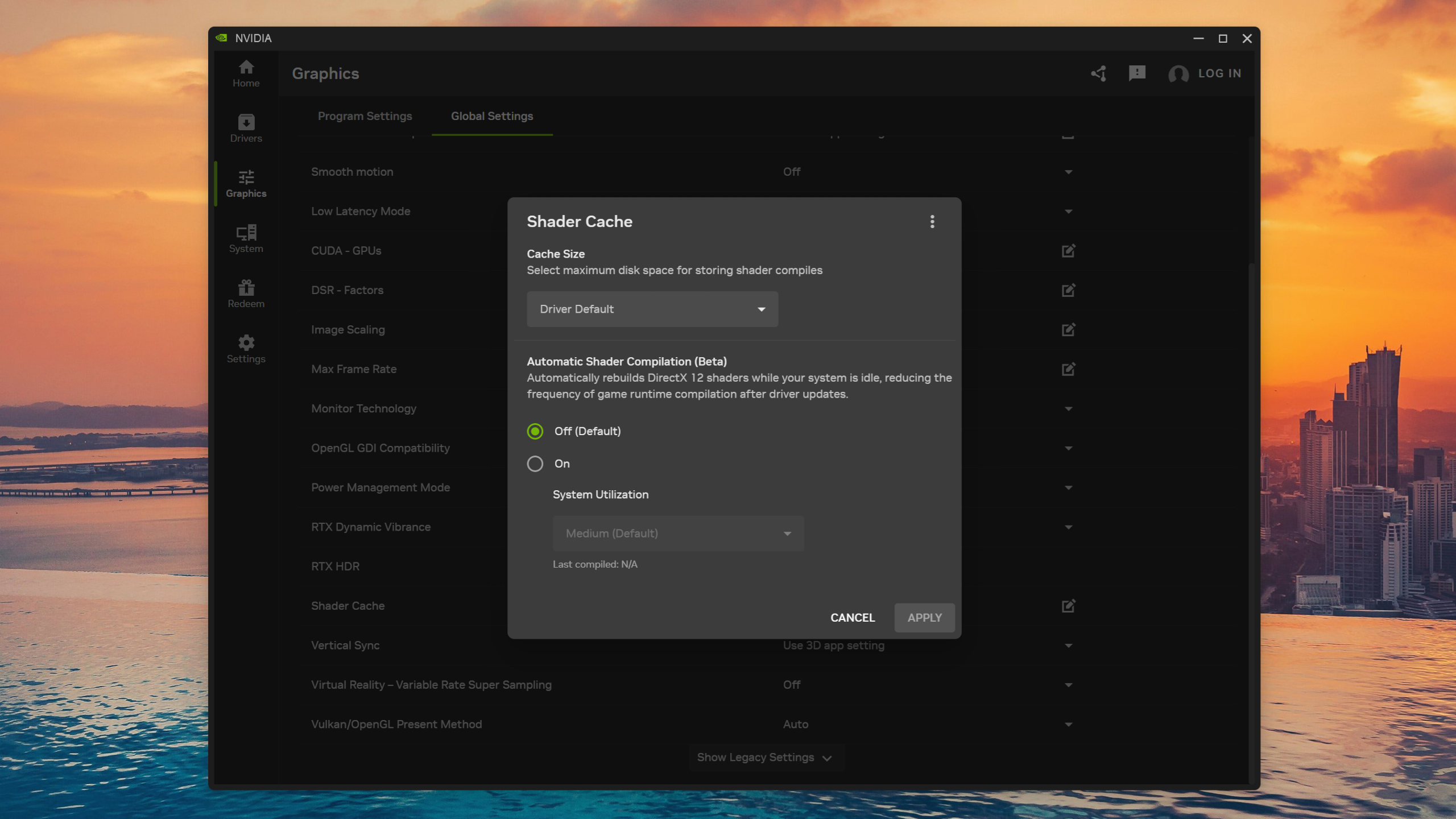
The update also adds a beta preview of a feature called Auto Shader Compilation, which attempts to rebuild your DirectX 12 game shader cache after a driver update during system idle time.
With more and more games avoiding stuttering issues with an initial shader compilation pass, the feature aims to cut down on a complete rebuild of the shader cache for every game after every driver update. As Nvidia has been firing out the hotfixes for its drivers at a rapid rate over the past few months, the beta preview of this particular feature seems timely.
Users will need to opt into the beta version of the app within the Settings>About page to test it out, and will need GeForce Game Ready Driver 595.97 to take advantage of all the new goodies.
Earlier this month, Nvidia announced that RTX 50-series owners would soon be able to use an improved version of Multi Frame Generation (MFG) in games, one that could dynamically switch between modes, including a new 6x option. After our first glimpse of it at the CES show in January, we've now had a chance to test it all out ourselves.
As a very quick recap, DLSS MFG works by having the graphics card render two frames normally, but keeping them both in VRAM. Then, through the power of AI, the GPU interpolates at least one frame that effectively slots in between the two (giving you 2x frame gen mode). Once that's been generated, all three frames get displayed in sequence, and the whole process repeats itself in the background.
The multi part in MFG refers to the fact that the generative stage can generate two frames (3x mode), three frames (4x mode), and with this latest update, five frames for 6x mode. Before you ask, no, there isn't an option to force a 5x override mode, even though Nvidia's MFG supports it.
Anyway, alongside the fixed override options is a new setting that lets DLSS MFG figure out what mode is best to use, based on your monitor's maximum refresh rate and the performance of the game—i.e. Dynamic Multi Frame Generation. For example, if you have a 240 Hz display, DLSS will switch between the various modes to keep the frame rate as close to 240 fps as possible.
NvidiaNvidiaNvidia
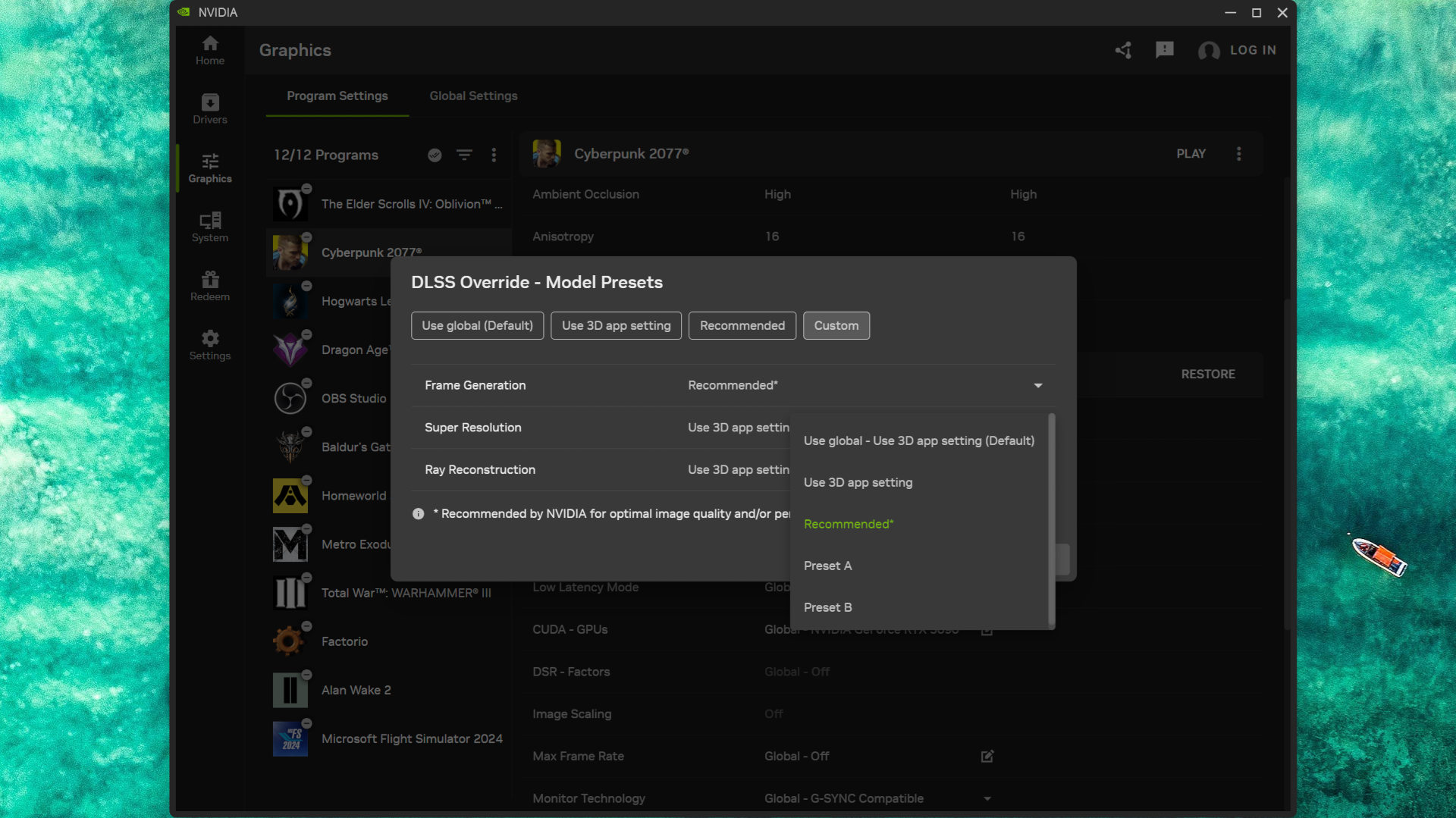
The new version of DLSS MFG also includes an updated AI model (aka Preset B) that "enhances in-game user interfaces by incorporating additional game engine data, improving visual quality and clarity of static user interface elements."
However, Nvidia notes that the new model "can only provide a benefit to games which expose a UI depth buffer, so it won’t work on all games, and not all supported games show significant improvement."
(Image credit: Nvidia)
Two examples of games that do support it are Hogwarts Legacy and Dragon Age: The Veilguard, though there are only 20 games in total that you can use Preset B with; everything else will just use the standard 'Preset A' model.
Anyway, none of this matters if the dynamic system doesn't work as intended or if the new model actually makes things worse. So let's get on and see it in action with a Ryzen 9 9950X3D and GeForce RTX 5090 combination, and an MSI MPG 321URX 240 Hz OLED monitor for handling the display duties.
Cyberpunk 2077
RT Overdrive | 4K DLSS Performance | No frame gen
To begin with, let's start with a 'ground truth' run of Cyberpunk 2077 at 4K, with RT Overdrive and DLSS Performance enabled (DLSS Ray Reconstruction disabled), to see what kind of frame rates we get. Nvidia Reflex is also disabled to get a sense of the baseline input lag.
I've used an updated version of Nvidia's Frameview (top left), along with a similarly updated Nvidia App statistics overlay (top right), to show accurate real-time performance figures, as well as information about the use of frame generation and the overall system latency (PCL).
As you can see, although the PCL figure is nice and low (so no discernible input lag), and the overall frame rate is around the 60 fps mark, the game comes across as being a little janky. This isn't the video; the game really does look that way in real life, because there's nothing other than the game controlling frame pacing (i.e. when frames are timed for display).
Now let's see it again, but this time with 4x Multi Frame Generation enabled in-game. You could use the Nvidia app to override it to 6x (FG needs to be activated for any override to work), but for now, let's just stick with 4x.
Cyberpunk 2077 runs a lot smoother with this level of frame generation, because the use of frame gen enables Reflex (which gets a better handle on the frame pacing), but unfortunately, the PCL is also a lot higher, and swinging the camera around feels a little sluggish. Not massively so, and certainly not enough to make the game unplayable, but it's certainly noticeable.
The above video shows another test run, but this time with Dynamic Multi Frame Generation enabled. Since native 4x mode couldn't achieve a constant 240 fps (it couldn't reach it full stop), it's no surprise to see that DFMG switches to 5x mode for a good portion of the test run. However, it's quite happy to drop down to 4x—240 fps is a target, not a hard restriction.
However, the slight increase in noticeable input lag with the in-game 4x frame generation is more apparent when DFMG switches to 5x, and you can see this clearly with the rise in the PCL to around 50 or so milliseconds. Again, it's not a game-breaking issue, and it's something that simply cannot be avoided with frame gen.
Since Dynamic MFG didn't need to switch to the new 6x mode, I did one more run with it enabled as a fixed override. It's interesting to note that the PCL isn't much worse than with DMFG's 4x/5x modes, and the average frame rate is even higher. However, the stuttery feel to Cyberpunk 2077 without frame gen makes a reappearance here, and that's possibly down to the sheer number of frames that now have to be paced correctly, or just something about my set up that doesn't like this level of frame generation.
Dragon Age: The Veilguard
Ultra | 4K DLSS Performance | No frame gen
Moving on to Dragon Age: The Veilguard, we start once more with a standard run at 4K Ultra DLSS Performance and no frame generation. This game runs pretty well without the aid of generated frames, though the average frame rate doesn't get anywhere 240 fps.
However, the system latency is a tad high for something averaging 130 frames per second, but DLSS is well implemented in Veilguard and enabling 2x frame gen in the game's settings produces an unexpected outcome: The PCL figure is lower.
Ultra | 4K DLSS Performance | In-game 2x FG
The reason for this is almost certainly down to the fact that the use of frame gen requires Nvidia Reflex to be enabled (which isn't for any of the baseline no-FG videos I've created). This system gets rid of the frame queue so that the CPU only prepares and issues a rendering command sequence when the GPU is ready for it.
If the GPU is quite busy trying to churn out a barrage of frames from the CPU, this synchronisation of CPU and GPU results in a lower PCL.
Frame generation in 2x mode produces an overall frame rate pretty close to 240 fps, which is why the use of Dynamic MFG doesn't change things. It stays in 2x throughout the test, giving you the input latency and performance that you need. This is a good thing, because when I first learned about DMFG, I was a little concerned that the system would base when to switch modes on a minimum frame rate.
It's clearly not doing that and is quite 'relaxed' about having the fps fall a little behind the maximum refresh rate.
One thing I found in my testing is that setting the DLSS Frame Generation model override to Recommended didn't result in Preset B being enabled, despite Nvidia saying that the game supported it. This model is supposed to help UI elements look better, but they appear completely fine with Preset A anyway.
So I tried the final run once more, but this time with Preset B selected in the override options, and saw absolutely no difference whatsoever: Not in performance, not in system latency, not in the visual fidelity of the UI. The same thing occurs with the next game I tested, too.
Hogwart's Legacy
Ultra | 4K DLSS Performance | No FG
When it first launched, Hogwarts Legacy rapidly garnered a reputation for running like a bag of spanners being dragged over a cobblestone road. It's thankfully an awful lot better these days, but when set to Ultra graphics with ray tracing enabled, the frame rate can still jump about all over the place, especially when you transition from being inside a building out into the open world.
For my test runs, I picked an area of Hogwarts Castle that starts quite simple for the Ryzen 9 9950X3D and RTX 5090 to handle, but then goes through a spot where there is a lot of ray-traced reflections and a whole host of NPCs, which neatly slices a fair chunk of the frame rate. As such, this should be a good exercise for Dynamic MFG to handle.
Ultra | 4K DLSS Performance | In-game 4x FG
Just like Cyberpunk 2077, Hogwarts Legacy natively supports up to 4x Multi Frame Generation, but while it does a great job of lifting the overall performance to a ridiculously high level, the fixed mode makes the heavy area feel a touch janky. If you watch the CPU and GPU utilisation figures carefully, you can see that the drop in GPU usage isn't as bad as before, but it's still quite high.
The use of DMFG doesn't eliminate this issue, though it does tame it down a touch, but the main benefit here is that since the frame gen mode never exceeds 3x, the PCL figure is better than with the fixed 4x mode.
I repeated the previous test with a fixed 3x mode and naturally got the same PCL, but it was always at that level. Using Dynamic MFG allows the graphics card to run in 2x mode when it's rendering fast enough, thus giving you a lower system latency.
The Elder Scrolls 4: Oblivion Remastered
Ultra | 4K DLSS Performance | No FG
The last game I tested Nvidia's new Dynamic Multi Frame Generation with was Oblivion Remastered, something that desperately needs as much help as possible to run well. Without Reflex enabled, the system latency is pretty awful (over 50 milliseconds), even though the average frame rate is fine.
Oblivion Remastered doesn't natively support HDR, but you can force it on via the game's config files. However, I haven't quite got the settings right for my monitor, which is why the videos look a touch washed-out compared to those for the other tested games.
Alas, where the use of frame gen and Reflex makes a big difference in Dragon Age: The Veilguard, it does little to improve how the remastered game feels. The PCL is lower, and the average frame rate is a lot higher, but the 1% low fps figure still lurks in the disappointing zone. It's only when you're basically looking at nothing but rocks and grass that things pick up, but that's hardly praise.
Before testing DMFG, I briefly checked out the fixed 4x and 6x modes. Neither made a wealth of differences (especially the latter), so once I completed a Dynamic Multi Frame Generation run, the result wasn't surprising. Switching between 3x and 4x, the system gets the required average frame rate, but it's just not enough to overcome the inherent jankiness of the whole game.
Dynamic MFG: The Verdict
(Image credit: Nvidia)
So, what to make of Nvidia's update to Multi Frame Generation? Well, it clearly works as intended, and any concerns you might have over how switching modes could affect gameplay don't appear to be an issue: It's practically instantaneous. But that doesn't mean it's something you should have enabled for every game, all the time.
That's because there are more costs to using frame generation than just an increased input latency, and the AI interpolation algorithm can't work from thin air and wishful thinking. Each generated frame requires a fair chunk of calculations, plus a smattering of extra VRAM to store the two pre-rendered frames and the extra AI ones.
What you can't do is enable Dynamic Multi Frame Generation on a graphics card like an RTX 5060 and expect your games to now happily run at 4K with path tracing. I tried to record footage of a GeForce RTX 5070 running Cyberpunk 2077, using the same settings as I did for the RTX 5090 and DMFG, but it ran so badly that the video stream collapsed after a few seconds.
Dropping the resolution to 1080p (but still using RT Overdrive and DLSS Performance) solved that problem, but as you can see in the video capture, it doesn't come across as being particularly smooth, even though the frame rates and PCL figures are generally fine (though the latter is a bit too high in places).
Frame generation can't fix performance issues inherent to a given gaming PC. It's best to think of it as being something that can lift 'decent' into the realms of 'great', e.g. a consistently smooth 60 fps is more than playable, so interpolating it up to 120 fps or higher shouldn't cause too many problems.
However, I do wonder a little just who Dynamic MFG is really for. Does it really matter that a game runs at your monitor's refresh rate when we have systems like G-Sync and FreeSync to remove screen tear? Yes, it can improve frame pacing for smoother gameplay, but that's mostly thanks to Reflex, anyway.
Few competitive gamers are going to use frame generation, let alone DMFG, to get super-high frame rates because of the increased input latency. Sure, on a high-end gaming PC, it's only a small increase, but esports shooter pros do everything they can to reduce latency, not increase it.
Dynamic MFG can't turn an RTX 5050 into an RTX 5090... (Image credit: Future)
PC gamers with a budget or mainstream setup, using a 144 Hz 1080p or 1440p monitor, might be tempted to try it out, but if they can already get 60 fps without frame generation, then DMFG is only going to use 2x mode for most of the time, perhaps 3x in some cases. Given that Nvidia's new system requires a game to have frame gen in the first place, you might just prefer to use that.
Having said that, Dynamic Multi Frame Generation is entirely optional, and it has to be employed on a per-game basis. You don't have to use 6x mode; you can set the cap to something much lower. In other words, you can choose to use it only where it gives you genuinely better performance and a nicer gaming experience. In games that don't do this, you can just ignore it.
You might not be interested in using the new feature, but if you have a GeForce RTX 50-series graphics card, you've now got something else to play around with for free, and there's nothing wrong with that.
I don't like my hopes to rise too high because there's always the chance they'll be dashed against the rocks, but the graphics card market of late is—dare I say it?—starting to look okay. We've seen prices float down to MSRP, and even below that in the recent October Prime Day sales. And now, if my eyes do not deceive me, I believe this is a single-slot RTX 5060 Ti.
It's not the first we've seen of the Unparalleled Max, as we saw the single-slot RTX 4060 Ti version last year. In fact, that's the only reason I know it's called "Unparalleled", because the machine translation on my end spits out "wushuang", which could be translated as any number of vaguely similar words to "unparalleled."
The fact that there's no English product page yet means we might have to wait a while to see this card in the West. And if/when we do, we should bear in mind that, as VideoCardz points out, it might be aimed at AI rather than gaming workloads because it being single-slot means it can be stacked alongside other cards for machine learning and AI processing.
Still, it is an RTX 5060 Ti, so you'll be able to use it for gaming. The question is just how cool it'll stay. It's a single-fan blower-style card, and the air actually exhausts out the same side as the fan, just more towards the backplate.
(Image credit: Galax)
The good news is that the RTX 5060 Ti, in general, tends to run pretty cool, as we found in our reviews (1, 2). The ones we tested tended to stay at mid-60 °C temps, which is a good sign. It also isn't a particularly power-hungry GPU, tending to consume under 200 W of power.
This makes it quite a good candidate for a single-slot card. In this case, the Galax RTX 5060 Ti Unparallelled Max runs at up to 2,572 MHz, which is the reference spec for the GPU. No overclock, then, but we shouldn't expect that for a thin card like this.
So, you can expect base RTX 5060 Ti performance out of this, which isn't bad at all. The RTX 5060 Ti is plenty for 1080p and even 1440p gaming, as long as you're willing to reduce your settings a little in some games for the latter resolution. And if you're happy enabling frame gen or Multi Frame Gen (MFG), even better.
Just bear in mind that while it's nice to see such a thin card, it might not help out too tremendously with that small form factor (SFF) build. That's because it's still 267 mm long, and while that's shorter than the typical card length of 290–300 mm, it's hardly the shortest card on the market. The Zotac RTX 5060 Solo, for instance, is just 164.5 mm long. You'd probably have a better time fitting a short card in an SFF build than a long and thin one like this.
Still, it does look gorgeous, and it's got that thin novelty factor, so I'll take it. Well, I'll take it once it comes to the Western market, at least.

 Login
Login